
Definitions Tree
The Definitions Tree provides a hierarchical view of all RDF terms that are defined in the active document. It shows all subjects which are supported ontology or taxonomy types and enables you to quickly navigate to their definitions or execute commands on them.
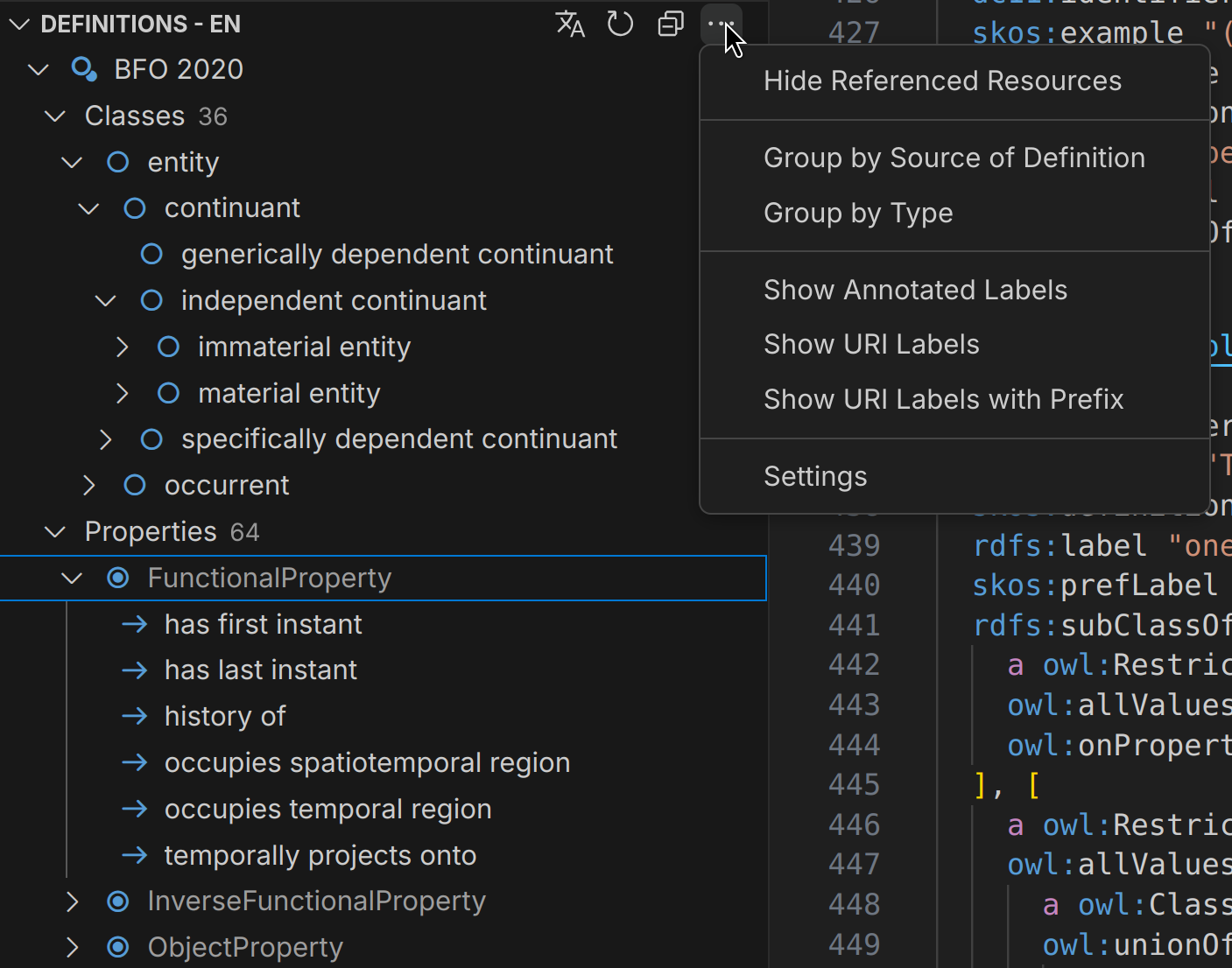
Title Bar
Section titled “Title Bar”The tree view is titled ‘Definitions’ and shows the currently active language tag for the displayed node labels. With definitions we refer to all RDF resources that are either defined as subjects in the current document or referenced by it and where the resource type was inferenced by the structural reasoner.
Primary Actions
Section titled “Primary Actions”The definitions tree offers several actions that are visible as icons in the title bar:
| Action | Description |
|---|---|
| Select Language | Selects the currently active language for the definitions tree. |
| Refresh Tree | Manually refreshes the definitions tree to reflect any recent changes in the files. |
| Collapse / Expand All | Collapse or Expand all nodes in the definitions tree. |
More Actions
Section titled “More Actions”Additional actions that can be accessed through the menu in the titlebar:
| Action | Description |
|---|---|
| Show / Hide Referenced Resources | Toggles the visibility of resources that are not defined as subjects in the current document, but are referenced by it. |
| Group by Source of Definition | Toggles if classes, properties etc. should additionally be grouped by their source of definition, e.g. the ontology or taxonomy they are defined in. |
| Group by Type | Toggles if classes, properties etc. should be grouped ‘flat’ in a single node per type. |
| Show Annotated Labels | Toggles if the tree should display labels that are annotated with RDF predicates for each node. |
| Show URI Labels | Toggles if the tree should always display the URI local names for each node. |
| Show URI Labels with Prefixes | Toggles if the tree should display the URI local names with their prefixes for each node, if a prefix is defined. |
| Settings | Opens the Mentor settings where you can configure various options related to the definitions tree and indexing. |
Tree Display
Section titled “Tree Display”This section describes the details of how nodes are being displayed and how this can be customised:
Node Labels
Section titled “Node Labels”The displayed name of nodes in the definition tree is determined by looking for a configurable set of label predicates. This is the default option and referred to as ‘Annotated Labels’ in the tree view settings.
In this mode, the displayed labels also consider language tags, preferring labels that match the currently set active language which is indicated in the title section of the tree view. The active language can be changed by clicking on the button in the tree title bar.
The predicates which are used for displaying the node labels can be configured in the settings. By default, Mentor uses the following preferred label predicates in order of priority:
- http://purl.org/dc/terms/title
- http://purl.org/dc/elements/1.1/title
- http://www.w3.org/2004/02/skos/core#prefLabel
- http://www.w3.org/2000/01/rdf-schema#label
- https://schema.org/name
- http://schema.org/name
- http://www.w3.org/ns/shacl#name
- http://www.w3.org/ns/shacl#path
If no label can be found, the local name of the IRI is used as a fallback.
You can also choose to always display the local name of the IRI instead of looking for annotated labels, or to display prefixed names if a prefix is declared for the namespace of the IRI. These options can be found in the menu of the tree view.
Definition Source Grouping
Section titled “Definition Source Grouping”By default, the defined terms are grouped by the ontology or concept scheme they are part of. This
is either determined by a shared namespace with an ontology header definition or by explicit
rdfs:isDefinedBy annotations in the document. If no source of definition can be found, the
terms are grouped under Unknown.
When available, the value of owl:versionInfo is also shown to indicate the version of an ontology.
There is also an option to turn-off grouping in the tree settings, which will show all defined terms
grouped by their type, regardless in which ontology / concept scheme they are defined. This option is
called Group by Type and can be toggled in the menu
of the tree view.
Referenced Resources
Section titled “Referenced Resources”It is quite common for ontologies or vocabularies to reference terms which are defined elsewhere, such as external ontologies such as RDF, RDFS or OWL. To be able to see which terms are actually defined in the document, Mentor renders the referenced terms in a shaded color to distinguish them from locally defined terms.
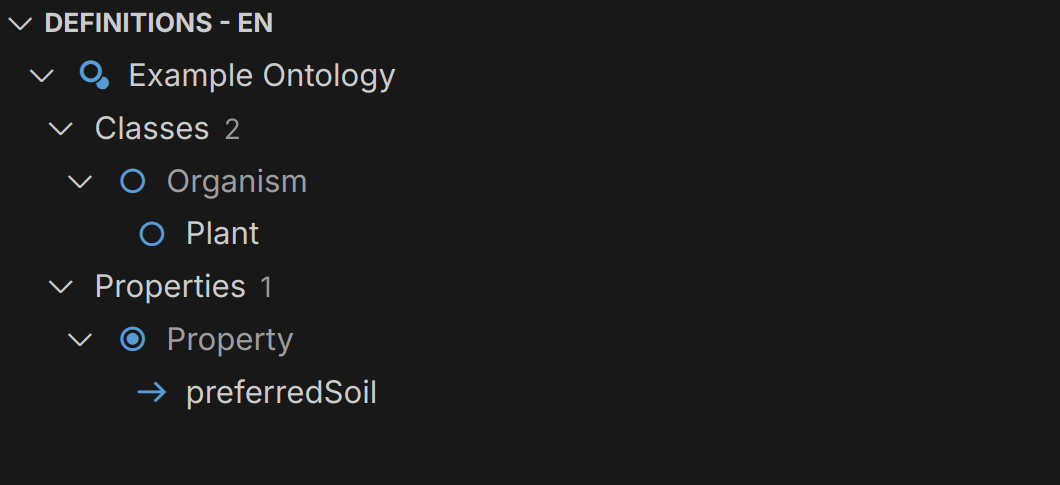
The greyed out items in the above screenshot are not defined in the current document, which means there
is no rdf:type statement with the respective subject.
Ontology
Section titled “Ontology”The tree features support for common ontology types such as classes, properties, and individuals and specialised types from the OWL and SHACL vocabularies.
RDFS, OWL
Section titled “RDFS, OWL”To support correct display of subclass relationships, Mentor applies structural reasoning to the ontology terms defined in the document. This means that if a class is defined as an OWL restriction or equivalent class, Mentor will infer its subclass relationships based on the OWL semantics.
| Icon | Type |
|---|---|
| Ontology | |
| Class | |
| Class with Individuals | |
| Individual | |
| Object Property | |
Datatype Property with range1 of xsd:datetime or xsd:date | |
Datatype Property with range1 xsd:boolean | |
Datatype Property with range1 xsd:integer or xsd:decimal | |
Datatype Property with range1 xsd:string or no explicit range |
1The range is determined either by the rdfs:range or the sh:datatype predicates.
The Definitions Tree also recognises SHACL shapes defined in the document. The tree provides actions to navigate to shape definitions and displaying datatypes for property shapes.
| Icon | Type |
|---|---|
| Node Shape | |
| Property Shape |
Taxonomy
Section titled “Taxonomy”The tree also supports SKOS terminology, such as concepts, concept schemes and collections.
Similar to ontology terms, taxonomy terms are grouped by their source of definition. If no
concept scheme is found, the terms are grouped under an Unknown category.
| Icon | Type |
|---|---|
| Concept Scheme | |
| Concept | |
| Collection | |
| Ordered Collection |
Settings
Section titled “Settings”The following settings can be used to configure the Definitions Tree: